How Metrics Are Calculated in the Department Report
In the report, all metrics are calculated only for the department external calls. This article provides a detailed overview of all call types, the formulas used to calculate metrics, and examples of calculations for different calls.
Call Types in the Report
- Incoming department call means an incoming call from an external number of any source: direct calls to an extension number, calls from the IVR menu, from callback widget, transferred calls, etc.
- Answered department call means a successful incoming call from the call history perspective that was distributed to the department. The call could have been answered by an attendant, another department, or a non-response forwarding number. In this case, the call is also included in the Non-response transfer group (this metric is only available in the Excel report export). Additionally, the answered call is considered successful for the employee who last spoke on the call. If there were multiple participants, other employees’ involvement in the call is recorded in the total time on calls.
- Missed department call means an incoming call to the department in which no conversation took place. If the call is forwarded to another department due to non-response and no conversation occurs there either, it is counted as missed by the department it initially reached. If a conversation with a customer started in another department but after it was transferred to your department, no one answered, the call is not counted as missed by your department, since it is still considered successful from the company’s perspective.
- Outgoing department call means an outgoing call made by a department employee to an external number. If such a call is transferred to another department or employee to continue the conversation, it is not counted as an incoming call for this department or employee. This call is counted as successful only for the employee who initiated it. The involvement of other employees in the call is recorded in the total time on calls.
Metrics in the Department Calls Report
Targeted Calls
These are successful calls where the conversations with department employees met the targeted call duration. If a single call included multiple conversations with department employees, the longest conversation within that call determines whether it is a targeted call.
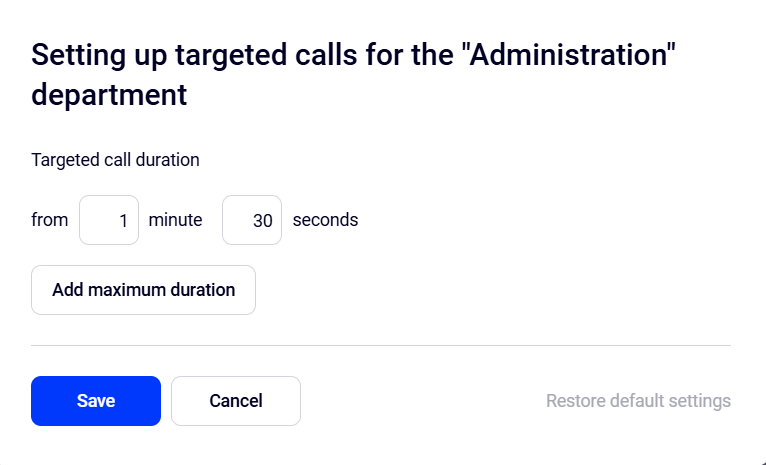
By default, calls lasting from 1 minute 30 seconds qualify as targeted calls. To change this, click the Set up targeted calls button.

Make the necessary changes in the window that opens and save them. If you want to prevent conversations with customers from running too long, set a maximum targeted call duration by clicking the corresponding button.
Average Conversation
This is the arithmetic mean of the durations of department employees’ conversations on successful calls lasting longer than 5 seconds.
If a successful call was later transferred to another department, the duration of employees’ conversations is counted in the average conversation statistics of the department the employee belongs to.
Average Daily Workload
This is the arithmetic mean of the average employee workload for each day that had at least one successful call.
Average employee workload for a selected day = total of conversation durations in successful external department calls on that day / number of department employees participating in successful calls on that day.
It is calculated by all employees who participated in successful department calls.
Employees may have call reception disabled or may have been included in the department for only part of the analyzed period. Therefore, an employee is included in the calculation if they had at least one successful call during the day.
If multiple employees from different departments participate in a call, the department workload is calculated based only on the conversation duration of your department employees.
Service Level
This is the share of incoming calls from customers that were answered within 20 seconds / the total number of successful incoming calls.
Customer waiting time is counted from the start of the ringback tone heard by the customer until the first contact with a department employee. Time spent navigating the IVR menu and listening to greeting messages is not included in waiting time.
If a single incoming call is transferred to the department multiple times due to inter-department transfers, for the customer waiting time is counted the longest wait among all attempts to reach the department.
By Employees
Average employee — the metrics in this row are calculated as the arithmetic mean for employees who had at least one successful call during the selected period.
All Tab
- Total successful = the number of answered incoming department calls where the employee was the last call participant + the number of successful outgoing calls initiated by the analyzed employee.
- Unique means the quantity of unique phone numbers among the successful employee’s calls.
- Average conversation is the arithmetic mean of the employee’s conversation durations in successful calls lasting more than 5 seconds.
- Total time in conversation is the total of the employee’s conversation durations in successful department calls.
- Employee’s targeted calls are calls in which the employee spoke with the customer for the time defined as targeted calls (see more details in the Targeted Calls section). If a single call involved multiple conversations with the employee (the call was transferred between colleagues several times), the longest conversation within that call is used to determine the targeted call.
Incoming Tab
In addition to the incoming call metrics, similar to those on the All tab, the following is displayed here:
- Average response speed is the arithmetic mean of the time it takes to reach the employee for all answered calls.
The time it takes to reach an employee in an answered call is the difference between when the call starts ringing on the employee’s phone (after it has been distributed to them) and when the answer. This metric often differs from the customer waiting time.
If Cloud PBX rings multiple employees for a single call, the response speed for this call is calculated for the employee for whom the call is counted asanswered.
Outgoing Tab
In addition to the metrics for outgoing calls, similar to those on the All tab, a manager can assess employees’ effort to reach customers by unsuccessful outgoing calls:
- Unsuccessful call attempts is the quantity of outgoing calls made by an employee that did not result in a conversation, and there were no successful outgoing calls to the same numbers by the employee on the same calendar day.
- Average attempts is the arithmetic mean of unsuccessful call attempts to one number.
- Dialing time is the arithmetic mean of the time the employee waited for a customer to answer for all unsuccessful attempts.
By Department Over Time
All metrics in this table are similar to the department summary metrics, but are calculated by day, week, and month.
Missed Call Insights Report Metrics
- Employees missed is the quantity of calls missed by the department where calls reached employees but went unanswered. There should be no such calls if Cloud PBX is configured correctly and employees handle calls responsibly.
- Employees were on other calls is the quantity of calls missed by the department where no calls reached employees because they were all on other calls. A high value indicates department overload. The share is calculated from incoming calls to the department in order to track changes over time.
- Off-hours of the number is the quantity of calls missed by the department that occurred outside the time defined as Working hours in the number schedule. If there are many such calls, consider adjusting the schedule, assigning an attendant, or improving the efficiency of the current one.
- Unique missed is the quantity of unique phone numbers among missed calls.
- Repeated missed = missed calls - unique missed calls.
- Average customer waiting time is the average time a customer waited for a response from an employee, excluding greeting messages and IVR (until the call got answered, transferred due to no response, or abandoned without ever getting an answer). Calculated as the total customer waiting time across all incoming department calls divided by the number of incoming calls.
If a single incoming call involves multiple attempts to reach the department (several transfers), the maximum waiting time across all attempts is used to calculate the customer waiting time.
For callbacks requested from the queue, the customer’s waiting time is counted from the first ringback tone the customer heard until they request a callback and hang up.
Unique Missed Calls Processing
- Didn't call back is the quantity and share of unique numbers among calls missed by the department with the Didn't call back or Unsuccessfully called back statuses in Cloud PBX history. This means that after the last missed call from a unique number, there were no successful calls involving that number within the target missed call processing period.
- Called back outside the department is the quantity and share of unique numbers among calls missed by the department, where the customer successfully called back again or was called by employees outside the department.
- Called back by the department is the quantity and share of unique numbers among calls missed by the department that were successfully called back by department employees.
- Average callback speed is the average time from the first missed call from the customer to the first callback attempt by a department employee. For the calculation, we take all unique missed numbers that employees called back, sum up the time from the first missed call to the employee’s first callback attempt, and divide it by the quantity of such callbacks.
By Employees
- Average employee. Metrics in this row are calculated as the arithmetic mean across employees who had at least one missed call during the selected period.
- Missed call contribution share = quantity of the missed calls where the employee was called / total quantity of department missed calls * 100%
- Total calls distributed to the employee is the quantity of incoming department calls routed to the employee.
- Total calls distributed to the employee left unanswered is the quantity of calls routed to the employee that were not unanswered.
- Declined by the employee is the quantity of calls routed to the employee that were declined by them.
- Callback attempts on department missed calls is the quantity of outgoing calls back to a missed call until the first successful outgoing call to this number or the successful incoming call from this number to the department. The metric is calculated based on calls missed by the department. All callback attempts count, both successful and unsuccessful.
- Average callback attempts to a missed call is total callback attempts / quantity of numbers called back.
By Department Over Time
All metrics in this table are similar to the department summary metrics, but are calculated by day, week, and month.
Examples of Report Generation
Missed by Department with an Available Employee and Non‑Response Transfer
Let’s see how a missed call will look in the report for Department 1 in the following situation:
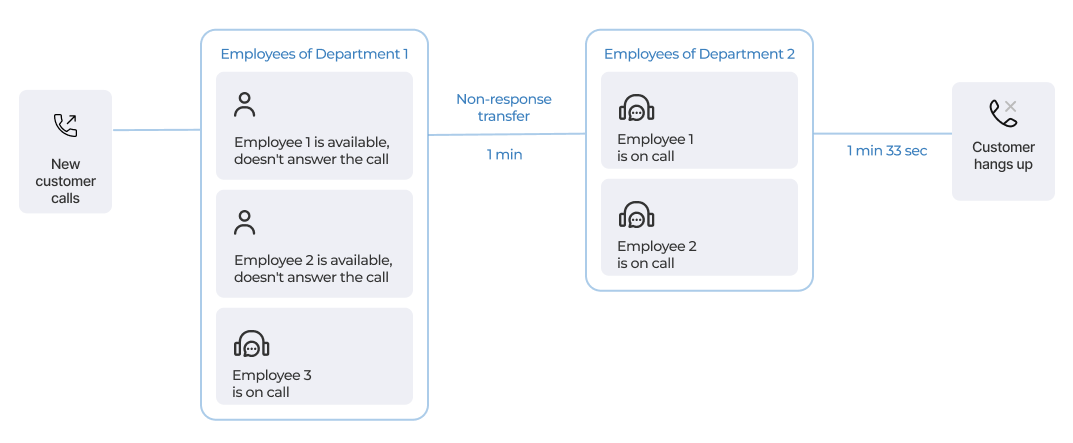
1. A customer called the company for the first time. The call came into the department during business hours, and it was the first call to the department that day.
2. The calls in the department are set to be distributed to Everyone at once. Employee 1 and Employee 2 were available but did not answer, while Employee 3 was busy.
3. After one minute, a non-rensponse transfer to another department was triggered.
4. The customer gave up waiting for an answer and hung up after 1 min 33 sec.
Department Summary
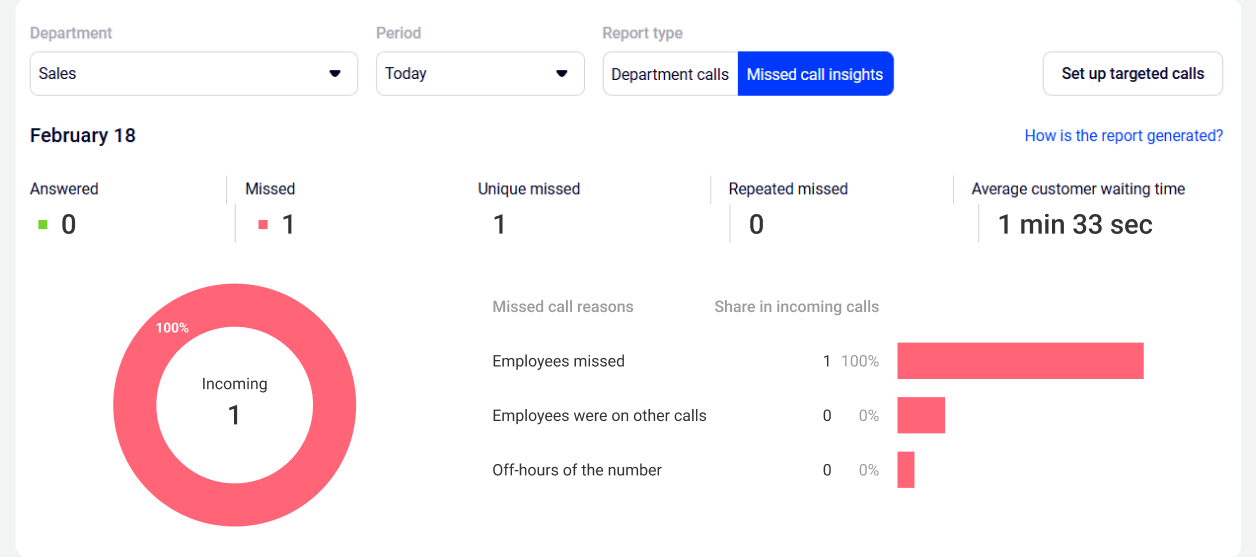
There will be no changes in employees’ successful calls, so all changes will appear in the Missed call insights report for Department 1 for today.
- Unique missed: 1. There was a missed call from a new customer.
- Repeat missed: 0. The customer did not call back.
- Average customer waiting time: 1 min 33 sec. It was the first call to the department that day, so the customer’s waiting time for this call automatically becomes the average waiting time.
- Employees missed: 1. The call appears here because there were available employees who could have answered it.
Unique Missed Calls Processing
This was the first missed call from the customer, so it will appear in the counters of unique missed calls processing.
- Didn’t call back: 1. There was no callback for the missed call. For the same reason, the other counters remain unchanged.

By Employees
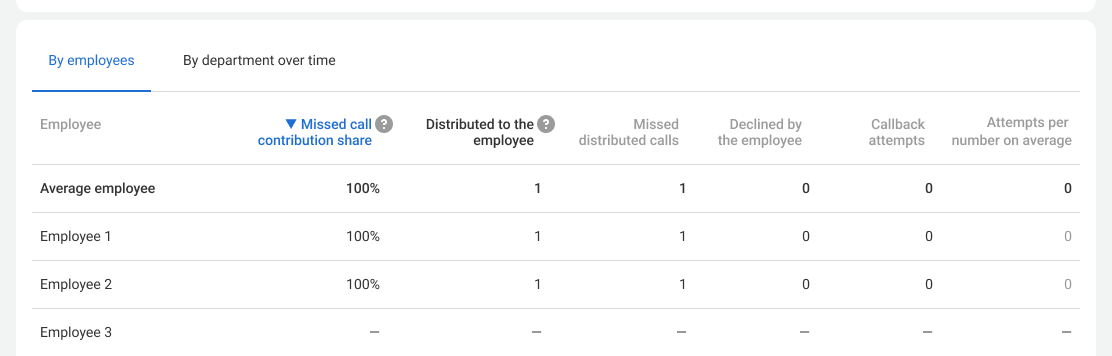
- Share of participation in missed calls: 100% for Employee 1 and Employee 2. Both could have answered the call while Employee 3 was on another call.
- Distributed to the employee: 1 for Employee 1 and Employee 2. The call was distributed only to them in the department before the non-response transfer.
- Missed distributed calls: 1 for Employee 1 and Employee 2. For the same reasons.
Answered by Department with One-by-One Distribution and Transfer to Another Department
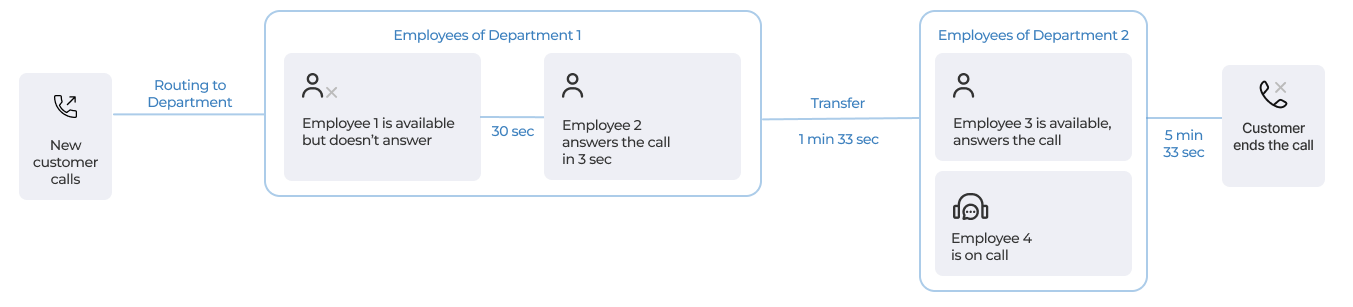
Let’s see how an answered call will look in the report in the following situation:
1. A customer called the company for the first time. The call came into the department during business hours, and it was the first call to the department that day.
2. The calls in the department are set to be distributed not to everyone at once (evenly or one by one).
3. Employee 1 did not answer. After 30 seconds, the call was distributed to Employee 2.
4. Employee 2 answered after 3 seconds and then transferred the call to another department.
5. The second department answered and completed the conversation. The total call duration was 5 min 33 sec.
Department Summary
There will be no changes to employees’ missed calls, so let’s open the summary of all Department 1 calls for today. Since the call was answered, it is considered successful.
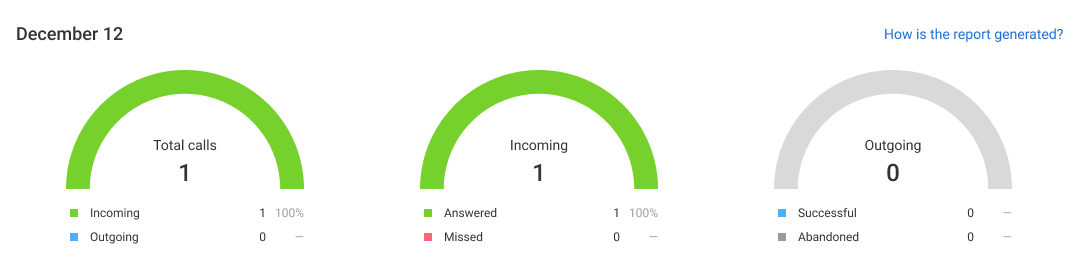
Because the call was ultimately answered, it is logged as answered in both departments’ history and reports. Let’s see how it is counted in Department 1 performance analysis.
- Targeted calls: 0. Although the call lasted 5 min 33 sec (which meets the target call threshold of 1.5 min), the customer spoke with Department 1 for less than one minute. Therefore, it is not considered a targeted call for Department 1 (but it is a targeted call for Department 2).
- Average conversation: 1 min. This is how long the Department 1 employee spoke with the customer before transferring the call.
- Service level: 0%. The customer waited 33 seconds for a response, which does not meet service-level standards.
- Average daily workload 1 min is equal to Employee 2’s time in conversation, as there were no other calls that day.

By Employees
All Tab
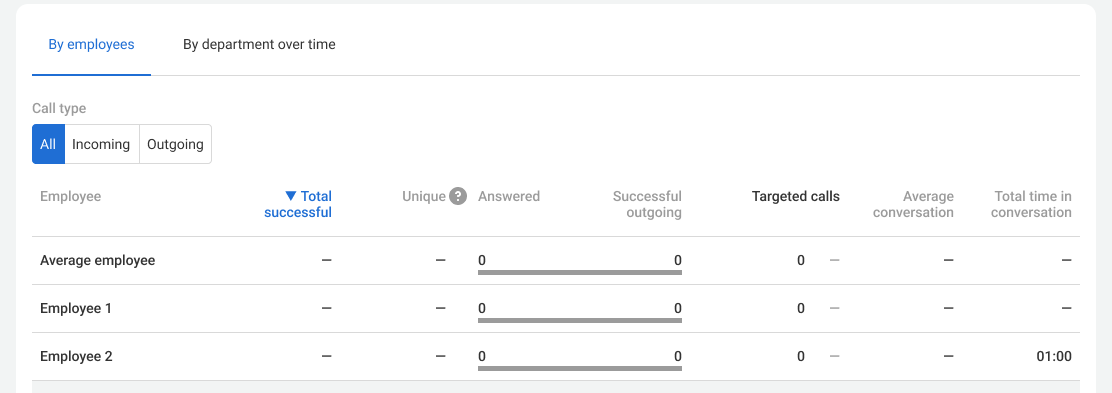
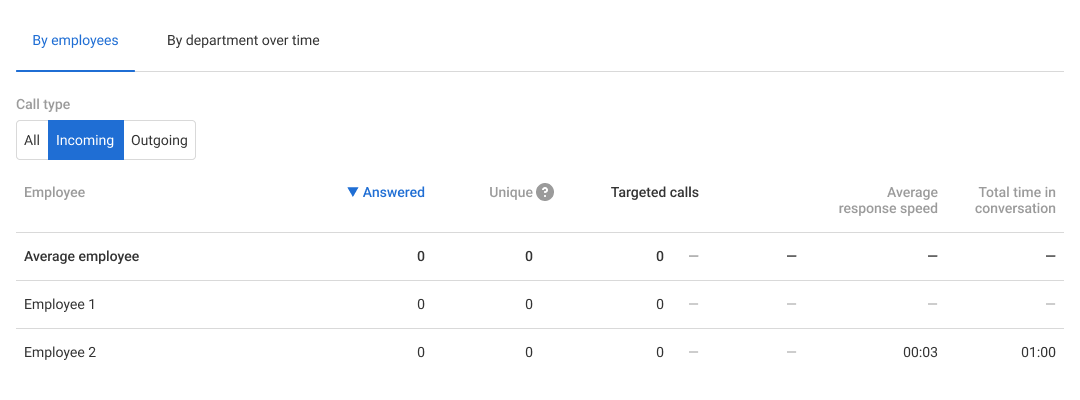
- Total successful: 0 for all employees. The employee did not complete the call but transferred it to another department instead.
- Unique, Answered, Targeted calls, and Successful outgoing 0. These metrics are calculated based on successful calls.
- Average conversation is not calculated, as it is based on the duration of successful calls.
- Total time in conversation is 1 min for Employee 2 only, since they participated in the conversation for so long, and it was the only call that day.
Since there are no employees with successful calls, all of the above metrics are not calculated for the average employee.
Incoming Tab
- Average response speed is 3 seconds for Employee 2, since this was the only call that day. It is not calculated for Employee 1, as they did not answer the call.
Outgoing Call Transferred to Another Employee of the Department
Let’s see how an outgoing call will appear in the report in the following situation:
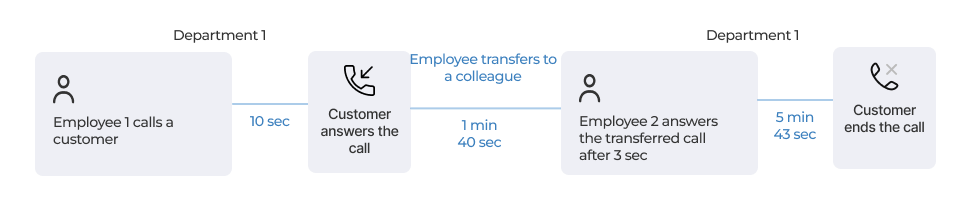
1. A department employee called a new customer. This was the first and only call that day.
2. Employee 1 transferred the call to Employee 2 within the department.
3. After speaking with Employee 2, the customer ended the call.
Department Summary
This is an outgoing call, so there will be no changes in the Missed call insights report. Open the summary for all department calls for today.
- Successful: 1. The call was answered and completed within the department.

- Targeted calls: 1. The call lasted 5 min 43 sec, which meets the targeted call threshold (over 1.5 minutes).
- Average conversation: 2 min 45 sec. Employee 1 spoke with the customer for 90 seconds, and Employee 2 for 240 seconds. Therefore, the average conversation equals (90+240)/2.
- Service level: unchanged, since this was an outgoing call.
- Average daily workload: 2 min 45 sec. It is calculated across all employees who participated in successful department calls — in this case, it is both employees.

By Employees
All Tab
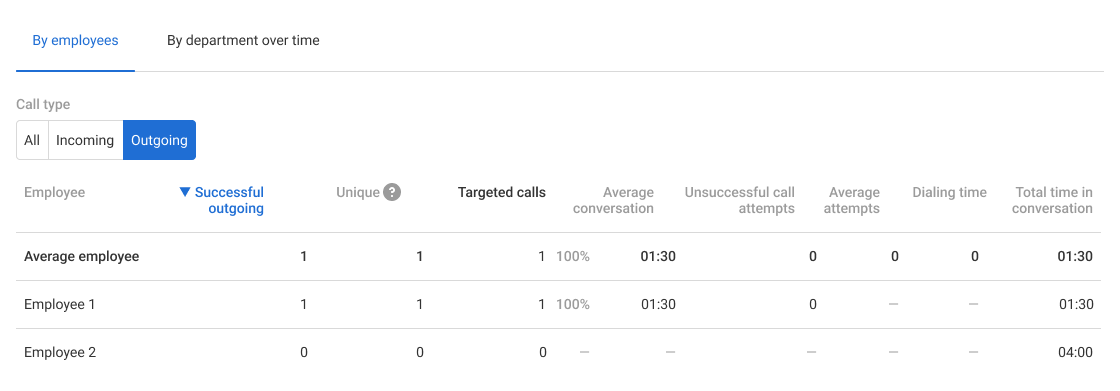
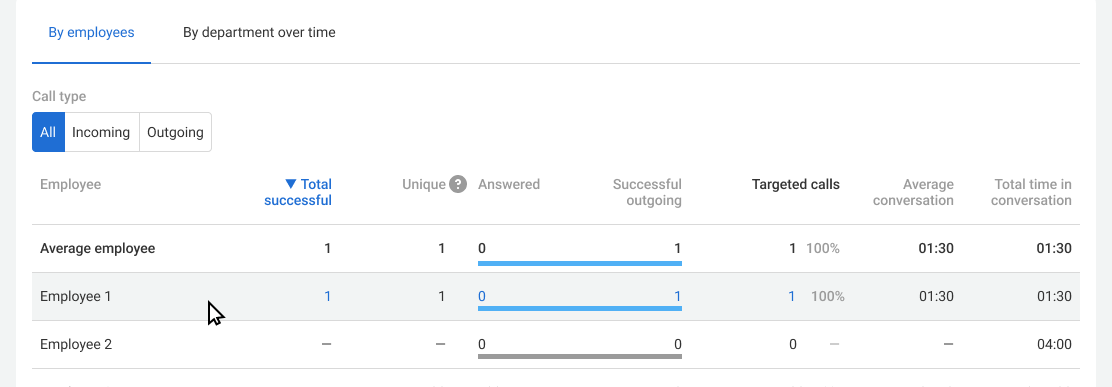
- Total successful and Successful outgoing: 1 for Employee 1 only, since they initiated the call;
- Targeted calls: 1 for Employee 1, since they spoke with the customer for 1 min 30 sec, which meets the minimum targeted call duration (1.5 minutes). Employee 2 spoke with the customer for 4 minutes, but the call is not considered successful for them, so it is not counted as a targeted call.
- Targeted call share across all successful calls for Employee 1 will be 100%. For Employee 2, it is not calculated because there were no successful calls.
- Average conversation and Total time in conversation are 1 min 30 sec for Employee 1, as this was the only call for the day. For Employee 2, only the total time spent in conversation (4 min) is displayed, since the average conversation is calculated only for successful calls.
Outgoing Tab
- Unsuccessful call attempts is 0 for Employee 1, since they made the call and reached the customer. For Employee 2, it is not calculated, as they did not make outgoing calls.
- Average attempts is not calculated. This metric is based on unsuccessful attempts, and the customer was reached on the first try.
- Dialing time is not calculated. This metric is based on unsuccessful attempts, and the customer was reached on the first try.